An AI powered YouTube research tool built for creators
My Role
Product designer - Majorily worked on channel videolytics, Search homepage & Outline docs
Team & Timeline





January 2025 - April 2025
Overview - A quick TLDR;)
Zero1 Creator Studio helps creators understand what's working on YouTube, so they can make better content decisions before they hit record.
This project started from a simple observation that most creators in the Zero1 by Zerodha network were following a same workflow every week.
Track competitors uploads
Open YouTube -> screenshot video thumbnails -> note competitors view counts -> paste it in a sheet -> try to spot patterns (what worked and what didn't)
Repurpose a competitors video
Through gut feeling creator decides the topic ->Does research (from News/web articles/even competitors videos on YouTube) -> Drafts a story outline doc -> Sketches story board -> Shoots video -> Track performance -> A/B test with thumbnail and Title for video on YouTube
The process was slow and manual. While creators could repeat it every week, there was no tool to automate it as part of their video creation workflow. Most video ideas were driven by gut feeling rather than data, making it difficult to know what to create to maximise views and engagement.
Quick product walkthrough
These are actual product recordings. Tool was designed and developed quickly to make it easy to use and had intelligence layer of OpenAi API for quick analysis.
Search homepage
Collections
A bookmark for all the videos that you search through keywords for video research, thumbnail analysis or title.

Design and development was quick as we used RadixUI design system and component library with Cursor for quick code implementation and used streamlit with claude code for quick POC.
Collection analysis
User can analyse and find hidden insight from the videos through comments, video transcripts and using Ai to to further distill his finds.
Channel & video analytics
A place to track the performance of the video with VPH (views per hour) , Engagement rate, Thumbnail modifications & Title changes that were done by the competitors channel.
Video transcript analysis
Deep research of a video through Ai using Angle bot and find repetition of most used phrases or retention peaks that keeps the video engaged throughout.
OUTcome
Zero1 Creator Studio is live and actively used by the internal team at Zerodha's Zero1 network. Creators use it daily to guide content strategy, benchmark comparable channels, and identify high-performing video formats before filming begins.

8%

14%
-39%
THE Problem — UX case study in Deets ;)
Creators spent significant time manually researching YouTube and comparing competitor videos, but lacked a simple way to turn this data into clear, actionable insights for deciding what to create next.
Conversations with early-stage and growing YouTube creators revealed a common pattern across video research. Everyone was manually checking competitor channels particularly noting down upload frequency, view counts, saving thumbnails and none of it felt like they had a real picture of what was working in their niche.
The research existed, but it was scattered and exhausting.

Pain points
Hard to know what’s actually working
Creators had no simple way to spot high-performing videos and understand which topics or formats resonated with their audience.
The research workflow is scatered
Creators switched between YouTube Studio, spreadsheets, and multiple browser tabs to track what competitors are uploading
market research
Existing tools either serve enterprise media teams or treat YouTube as just another social channel.
Nothing was designed for the specific thing creators actually do before filming.


Channel stats, subscriber tracking,
growth comparison

Deeper content insights, topic ideation,
thumbnail analysis

Keyword research, SEO, channel audits,
competitor tracking
Strategic content decisions, audience
behaviour, detailed format analysis
Other social Media management tools
Tools like Hootsuite and Sprout Social offer broad social media scheduling and basic analytics. They treat YouTube as one channel among many rather than a primary platform, and lack the video-level depth as retention curves, outlier detection, thumbnail analysis that creators require.
HOW Might we
Understanding creators
I spent a week doing the research the way creators did.
To understand the problem beyond interviews, I recreated the workflow myself. I tracked 5–6 channels, monitored upload patterns, saved thumbnails, compared views and engagement, and recorded everything in spreadsheets and notes.
The pattern was clear the information existed, but finding and connecting it was painfully manual. With dozens of videos and Shorts being published every week, the process was time-consuming, easy to miss things in, and difficult to scale.

Data already existed. The problem was making sense of it.
I started by exploring the tools creators already had, including YouTube Studio. It already exposed useful signals such as audience retention and video performance.
But these insights were mostly locked inside individual workflows. Creators still had to manually collect, compare and interpret information across videos and channels.
What if we could bring these existing signals together and turn them into something creators could actually use for research?
API research validated that we could build this layer.

YouTube Data API v3
We could pull channel- and video-level signals such as views, subscribers, likes, comments and video counts, giving us the foundation to build a more structured research experience.
Design Process
We didn’t want to teach creators a new tool. We wanted to make their existing research workflow smarter.
Creators already knew how to browse YouTube, compare videos, and look for patterns. The opportunity was to layer intelligence onto that familiar behaviour rather than introduce another complex dashboard.

Homepage - Helping creators discover what’s worth researching
We moved from search-first discovery to an explore-first experience, bringing channels, videos, performance signals and AI-assisted research into one place.

Navigation evolved to support AI without disrupting the feed
As the product shifted from keyword-based search to AI-assisted research, we needed a way to introduce the new interaction without taking creators away from the feed they were already familiar with.


Collections - Turning scattered research into a reusable research workspace.
Collections were designed around a simple behaviour: creators rarely research one video in isolation. They find multiple videos, compare them, save the useful ones, and come back to them when developing an idea.
The challenge was to make this research easy to capture, organise, and revisit without forcing creators into a separate research workflow.


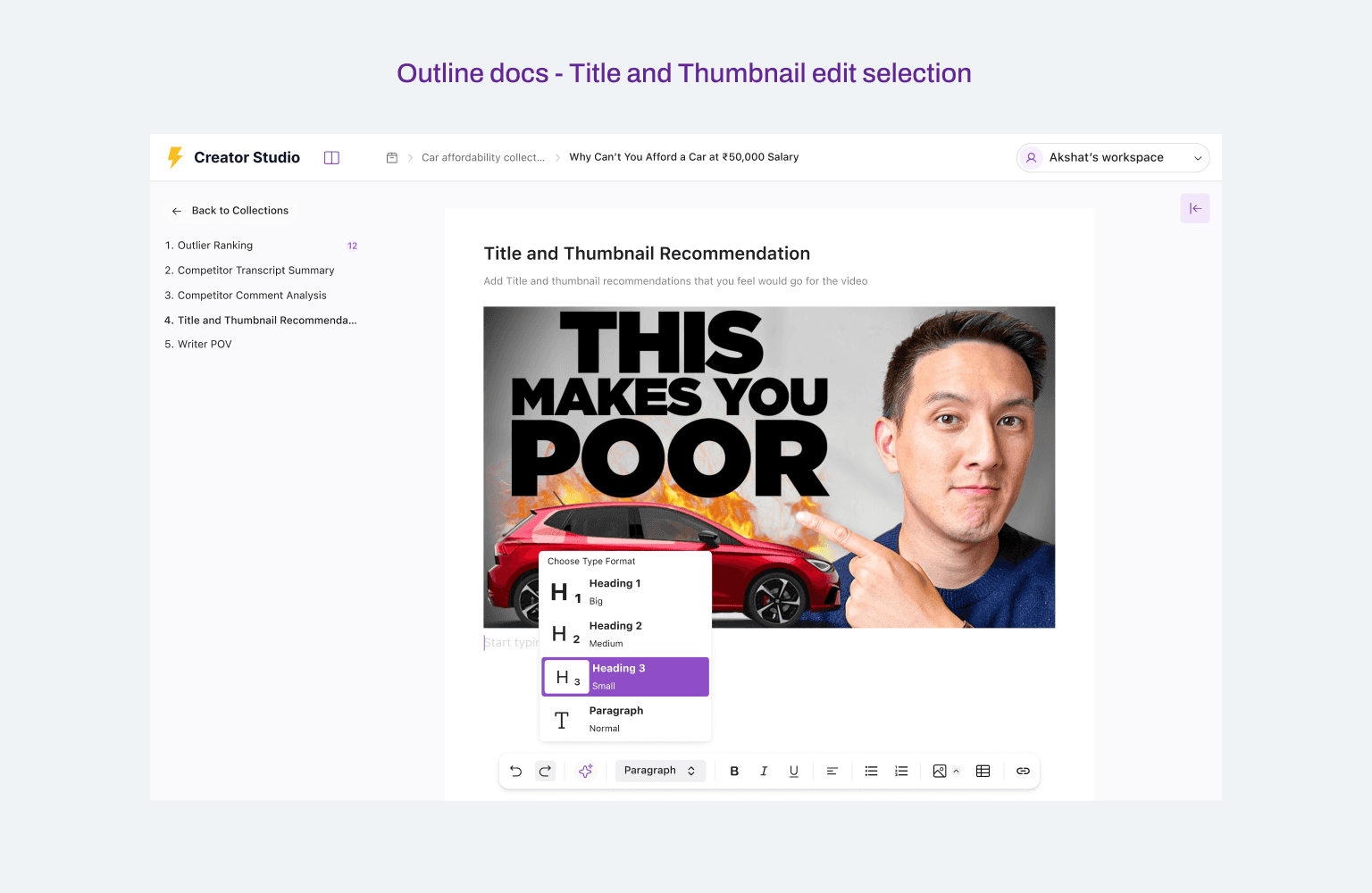
Outline docs - Turning research into a structured writing workflow
Once creators had researched competitors, the next challenge was turning that research into an actual video idea and script. Outline Docs brings the entire transition from research to writing into one workspace.
Instead of leaving creators with a pile of research, we created a structured workflow that moves from competitor analysis and audience insights to titles, thumbnails, POV and finally a first script draft, with AI helping at each stage while keeping the creator in control.




Videolytics - From performance metrics to understanding why a video worked
Finding a high-performing video was only the first step. Creators also needed to understand what made it work before using those learnings in their own content.
Videolytics was designed as a deeper research layer, combining video performance data, content changes, retention moments, transcripts, and audience feedback in one place.


Channelytics - From tracking channels to comparing performance
Channelytics extended the same analytical thinking from Videolytics, but moved the focus from individual videos to entire channels.
Creators needed to understand not just what one competitor was doing well, but how different channels were performing over time and where the patterns differed.

TAKEAWAY
I learned that designing AI means designing the interaction around AI as layer that makes an existing workflow more capable.
Building Zero1 Creator Studio taught me that the hardest part of AI design isn't adding intelligence. It's finding where it genuinely helps the user.
What I'd do differently
Looking back, I would validate the end-to-end workflow earlier rather than exploring individual features first. The more I worked through the project, the clearer it became that Search, Collections, Videolytics, Channelytics and Outline Docs weren't separate features. They were different stages of one larger creator workflow.